
 It’s the end of an era. Let’s make it clear: I’m just talking about technology, software, phones, companies… nothing worth shedding tears or being in big pain, but what has happened in these weeks, and still is happening, has a bitter taste.
More than at a general level, it has a bitter taste also – and mainly, being me the main subject of this site! – at my personal level. I’ve owned only Nokia phones for decades, beginning with the 5110, then the 6310, 6150,7210, 6600, N80, N82 and the latest N85. I’ve always been faithful to a brand being considered by me – and many others – as the absolute top. An european product, built in total independence and autonomy, drawing the lines to which all others had to come up to, even those who were leaders in other markets.
Yes, a brand that has also made mistakes, that rested on its own laurels in the latest years, letting other newcomes to start barking loud, partly for too much self confidence, and partly for a sort of philosophical idea, which is the one that I also support, stating that phones are for phoning. It’s nice and cool if they can do also other stuff, but it’s not that much important. Browsing the internet, reading mail, talking with this or that, they are all nice, interesting, useful and sometimes comfy features, but in the end the main tool for such things is another one, the PC, and what truly matters in a phone device is good phoning audio quality, good signal reception, a good addressbook, and simple menus.
This philosophy has been widely abandoned during the latest years, with phones doing everything and more, and with a lot of people using them to do things you’d normally do with a PC. But Nokia was doing something on this field, they were working on a new operating system, actually a full Linux distribution – after all Nokia is finnish and Linux was born in Finland – which was going to be something really new, with the ability to run KDE applications, with an open environment that would have been able to compile and install free software packages beyond the AppStore logics of Apple and Android – even if this would have been available too. A real dream OS. A dream in which a lot of people, including me and all those who had not wanted to switch to Blackberry or iPhone or Android, were believing and were patiently waiting for, with no hurry – because phones are for phoning, and my current Symbian based phone still does this very well – and we were honestly sure that the Nokia giant was there ready about to wake up and bash all these newcomers with just the power of his finger. breaking their illusiong of making him worried.
But Nokia made all us wake up, and the dream is over. The new system, MeeGo, is late. It’s always been late since when it’s being conceived, and a deal has been striked with Microsoft to use Windows Phone 7 as main platform. A full and total capitulation of all was being done, and of all what Nokia has been meaning until now!
This decision may even bring positive market results in the long term – it’s not bringing them right now -, but it leaves all faithfull supporters stupified, disappointed and angry. They had not left yet also because they definitively didn’t want any Windows on our phones. And they still don’t want any. And thus they’re not going to buy a Nokia phone anymore. Just like me, I am now forced to take into consideration something not being a Nokia as my next phone, after no less than 15 years. And obviously this will be an Android, since the only apples that will ever enter my house are those coming from trees.
(All the technical and political considerations, the theory of US and Microsoft’s plot, the role of Elop as Ballmer’s trojan horse, the talks on what actually good might have comed from Meego, and on the goods and bads of WP7, on what’s happening in Finland, on Nokia workers’ strikes, on the finnish government being worried, on the European Union financing projects that Nokia has now implicitly declared dead, and all such I leave it to articles, blog posts and comments that are only second to those discussing our Prime Minister’s judiciary issues.)
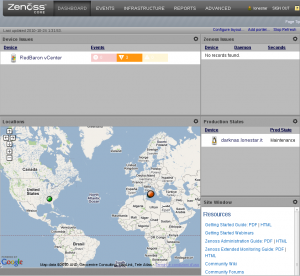 Zenoss is distributed by a company selling it for enterprise usage, but the Core version is available free of charge, and it comes with all the features needed to reach a nice result.
 As you can see,


